Download
1 variant available




SD WebUI Prompt Style
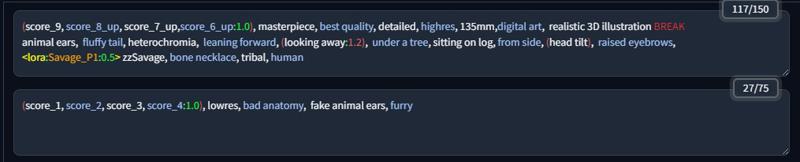
Extension for AUTOMATIC1111/stable-diffusion-webui to colorize your prompt.
Install
Open the
Extensionstab and navigate toInstall from URL.Paste the repository URL into the
URL for extension's git repositoryfield:https://github.com/bandifiu/sd-webui-prompt-style.git
Press the
Installbutton.Restart the WebUI using
Reload UIbutton
Customization
You can customize colors by changing CSS variables in your user.css at the root of WebUI intallation.
If no
user.cssfile present, create oneThe following variables are available.
Reload the browser.
.prompt-style {
    --keyword-color: var(--body-text-color);
    --keyword-odd-color: #a0c1f7;
    --colon-color: #56fd6c;         /* :            */
    --block-color: #ee6565;         /* ( )          */
    --block-brackets-color: #56fd6c;/* [ ]          */
    --block-angle-color: yellow;    /* < >          */
    --network-type-color: yellow;
    --network-color: orange;        /* LoRa name    */
    --pipe-color: #e93232;          /* |            */
    --break-color: #e93232;         /* BREAK        */
    --delimiter-color: white;       /* ,            */
    --weight-down-color: #1bff39;   /* weight < 1   */
    --weight-up-color: #ee6565;     /* weight > 1   */
    --weight-color: #1bff39;        /* weight = 1   */
    --comment-color: #0a941d;       /* #comment     */
}